Spring Security Explained: Understanding Authentication, JWT, and OAuth2 from the Inside Out
Spring Security Explained: What Really Happens Behind Every Login Request?
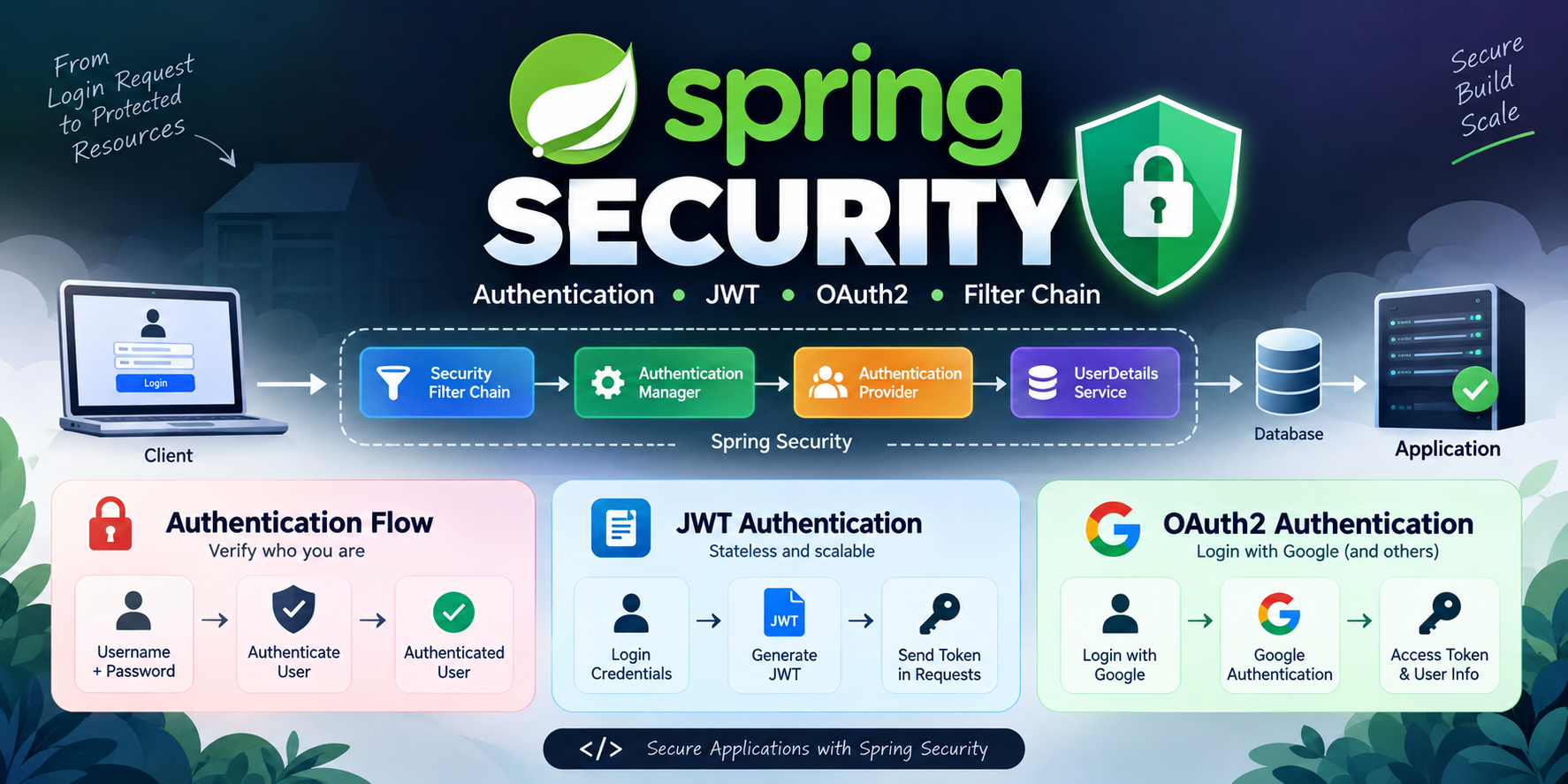
When I first started learning Spring Security, I was overwhelmed by terms like Security Filter Chain, Authentication Manager, Authentication Provider, UserDetailsService, JWT, and OAuth2. Every tutorial explained these concepts individually, but very few explained how they work together as part of a single authentication process.
The turning point came when I stopped treating Spring Security as a collection of classes and started viewing it as a journey that every request follows before reaching my application.
In this article, we'll follow that journey step by step and understand what actually happens when a user logs in, accesses a protected endpoint, authenticates using JWT, or signs in with Google using OAuth2.
Why Do We Need Spring Security?
Imagine building an application without security.
Anyone could:
Access private data
Modify resources
Pretend to be another user
Call protected APIs
Spring Security acts as a security layer between the client and your application. Every request must pass through this layer before reaching your controllers.
Think of it as a security checkpoint at an airport.
You cannot directly enter the boarding area. First, your identity is verified, your permissions are checked, and only then are you allowed to proceed.
Authentication vs Authorization
Before diving deeper, let's understand two important terms.
Authentication
Authentication answers:
"Who are you?"
The system verifies your identity using credentials such as:
Username and Password
JWT Token
Google Login
GitHub Login
Example:
You enter your username and password. The application checks whether those credentials are valid.
If valid, you are authenticated.
Authorization
Authorization answers:
"What are you allowed to do?"
After authentication, the application checks permissions.
Example:
ADMIN can delete users.
USER can view their profile.
MANAGER can approve requests.
You may be authenticated but still not have permission to access certain resources.
The Journey of a Login Request
Whenever a user sends a request, Spring Security intercepts it before it reaches the controller.
The flow looks like this:
Client
   ↓
Security Filter Chain
   ↓
Authentication Filter
   ↓
Authentication Manager
   ↓
Authentication Provider
   ↓
UserDetailsService
   ↓
Database
Every component has a specific responsibility.
Let's understand each one.
Security Filter Chain: The Gatekeeper
The Security Filter Chain is the first component that receives incoming requests.
Think of it as the main entrance gate of your application.
Every request must pass through this gate.
Responsibilities:
Intercept requests
Check security rules
Trigger authentication
Trigger authorization
Block unauthorized access
Without the Security Filter Chain, Spring Security would not know how to secure your application.
In modern Spring Security, we configure it using:
@Bean
public SecurityFilterChain securityFilterChain(HttpSecurity http) throws Exception {
    return http.build();
}
This chain contains multiple filters that execute in a specific order.
Each filter performs a small security-related task.
Authentication Object: The Identity Card
Spring Security stores authentication information inside an Authentication object.
Think of it as a digital identity card.
It contains:
Username
Password (before verification)
Authorities
Authentication status
Before authentication:
authenticated = false
After successful authentication:
authenticated = true
This object travels through the security workflow and eventually gets stored in the Security Context.
Authentication Manager: The Coordinator
The Authentication Manager acts as a coordinator.
It does not verify credentials itself.
Instead, it delegates authentication to an Authentication Provider.
Flow:
Authentication Filter
        ↓
Authentication Manager
        ↓
Authentication Provider
Think of a hospital receptionist.
The receptionist doesn't perform surgery.
Instead, they direct patients to the appropriate doctor.
Similarly, Authentication Manager directs authentication requests to the correct provider.
Authentication Provider: The Decision Maker
Authentication Provider performs the actual verification.
Responsibilities:
Verify credentials
Load user details
Compare passwords
Create authenticated Authentication object
Example:
A user enters:
Username: satyajit
Password: password123
Authentication Provider:
Loads user details
Checks password
Verifies credentials
Marks authentication as successful
If credentials are incorrect, authentication fails immediately.
UserDetailsService: Fetching User Information
The Authentication Provider needs user data.
This responsibility belongs to UserDetailsService.
Example:
@Override
public UserDetails loadUserByUsername(String username) {
    return userRepository.findByUsername(username);
}
Its job is simple:
Given a username, return user information.
Usually, it fetches:
Username
Password
Roles
Authorities
The data may come from:
MySQL
PostgreSQL
MongoDB
External Services
Think of UserDetailsService as a librarian.
When someone requests a book, the librarian retrieves it from storage.
Password Encoding
Storing passwords in plain text is extremely dangerous.
Bad practice:
password123
Good practice:
$2a$10$Y...
Spring Security uses PasswordEncoder to hash passwords.
Common choice:
@Bean
PasswordEncoder passwordEncoder() {
    return new BCryptPasswordEncoder();
}
Benefits:
Passwords are not readable.
Even database leaks are less harmful.
Verification remains secure.
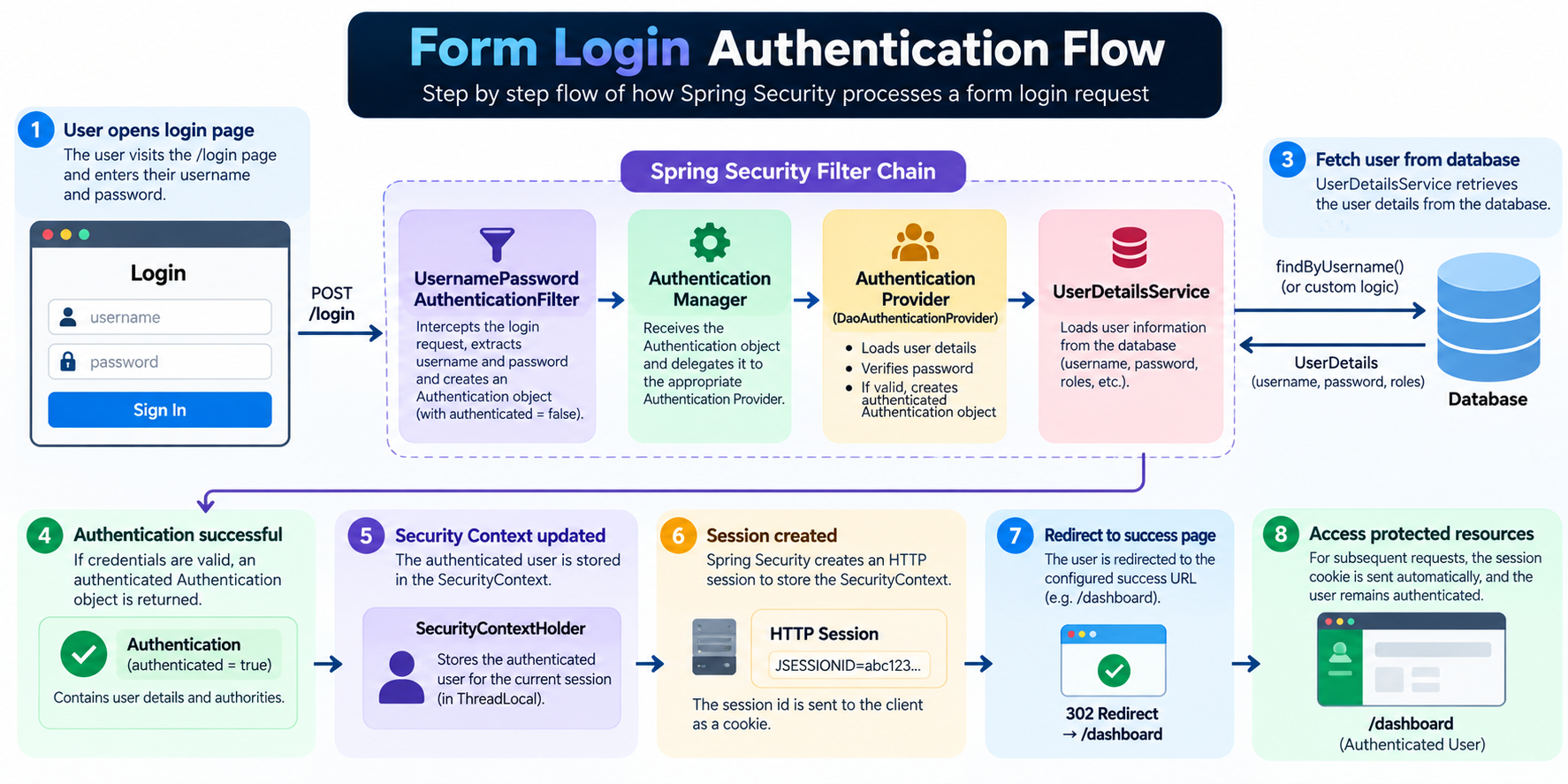
Form Login Authentication
Form Login is the traditional login mechanism.
Flow:
User
 ↓
Login Form
 ↓
UsernamePasswordAuthenticationFilter
 ↓
Authentication Manager
 ↓
Authentication Provider
 ↓
Database
 ↓
Success
The browser sends credentials using an HTML login form.
Spring Security processes those credentials and creates a session after successful authentication.
Advantages:
Simple
Built-in support
Session management handled automatically
Best suited for:
Traditional web applications
Admin dashboards
HTTP Basic Authentication
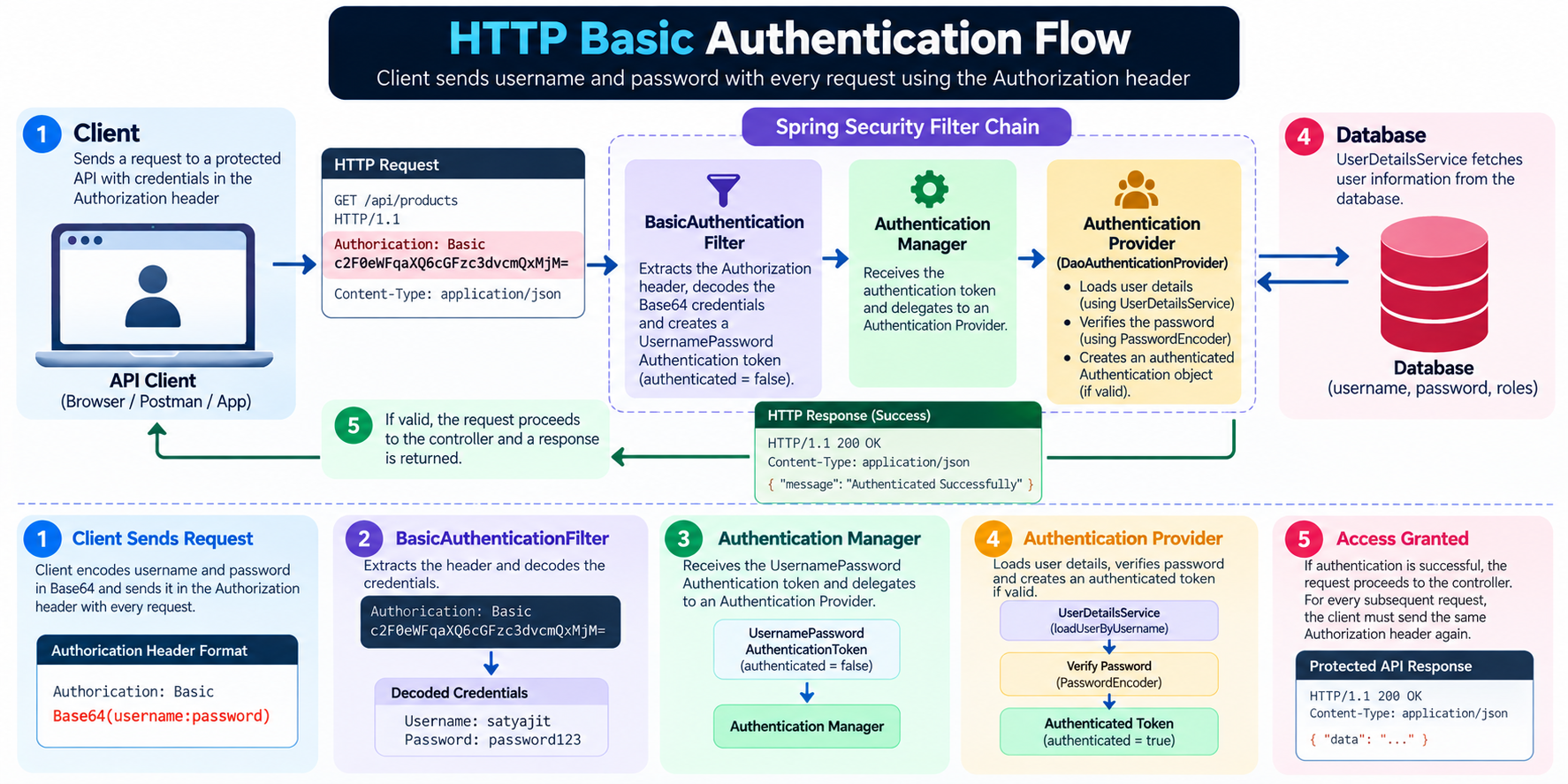
HTTP Basic Authentication is much simpler.
The client sends credentials with every request.
Example:
Authorization: Basic Base64(username:password)
Flow:
Request
 ↓
Username + Password
 ↓
Header
 ↓
Server Validation
Advantages:
Easy to implement
Useful for testing APIs
Disadvantages:
Credentials sent repeatedly
Less user-friendly
Not ideal for modern applications
You often use HTTP Basic during development and API testing.
JWT Authentication
Modern applications commonly use JWT (JSON Web Token).
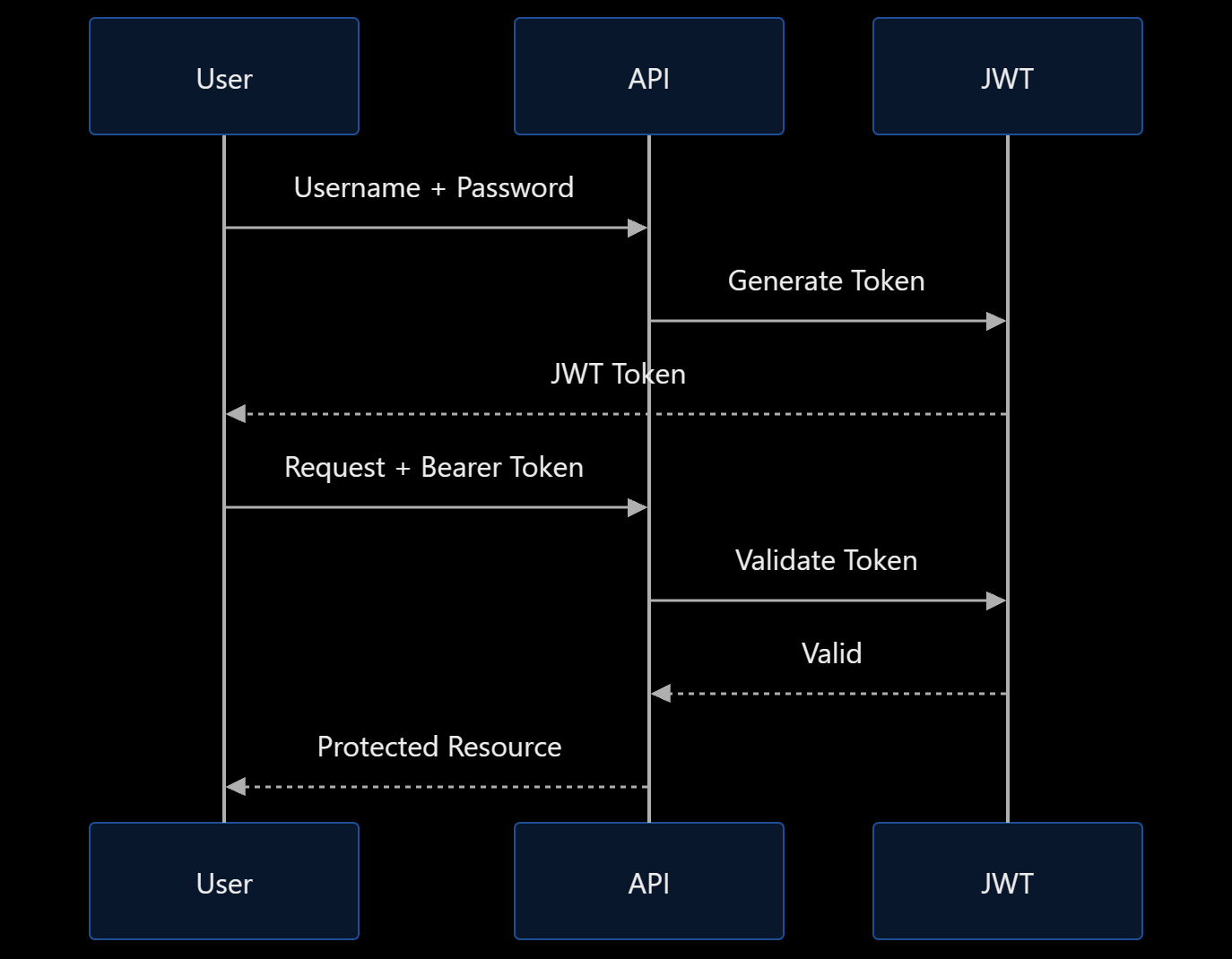
Instead of creating sessions, the server issues a token after successful login.
Login Flow
Username + Password
        ↓
Authentication Manager
        ↓
Authentication Provider
        ↓
JWT Generated
        ↓
Client Stores Token
The client stores the token.
Future requests contain:
Authorization: Bearer <JWT>
Request Flow with JWT
Request
 ↓
JWT Token
 ↓
JWT Filter
 ↓
Token Validation
 ↓
Authentication Created
 ↓
Controller
The server verifies the token and grants access.
No session storage is required.
Benefits:
Stateless
Scalable
Perfect for microservices
Widely used in modern APIs
Default UserDetails vs Custom UserDetails
When starting Spring Security, you often see:
Using generated security password:
Spring Security automatically creates a default user.
While useful for learning, real applications require custom users.
Custom UserDetails allows:
Database integration
Roles
Permissions
Custom attributes
Example:
public class CustomUserDetails implements UserDetails {
}
This gives complete control over authentication.
OAuth2 Authentication
OAuth2 enables users to authenticate using third-party providers.
Examples:
Google
GitHub
Facebook
LinkedIn
Instead of storing another password, users sign in using an existing account.
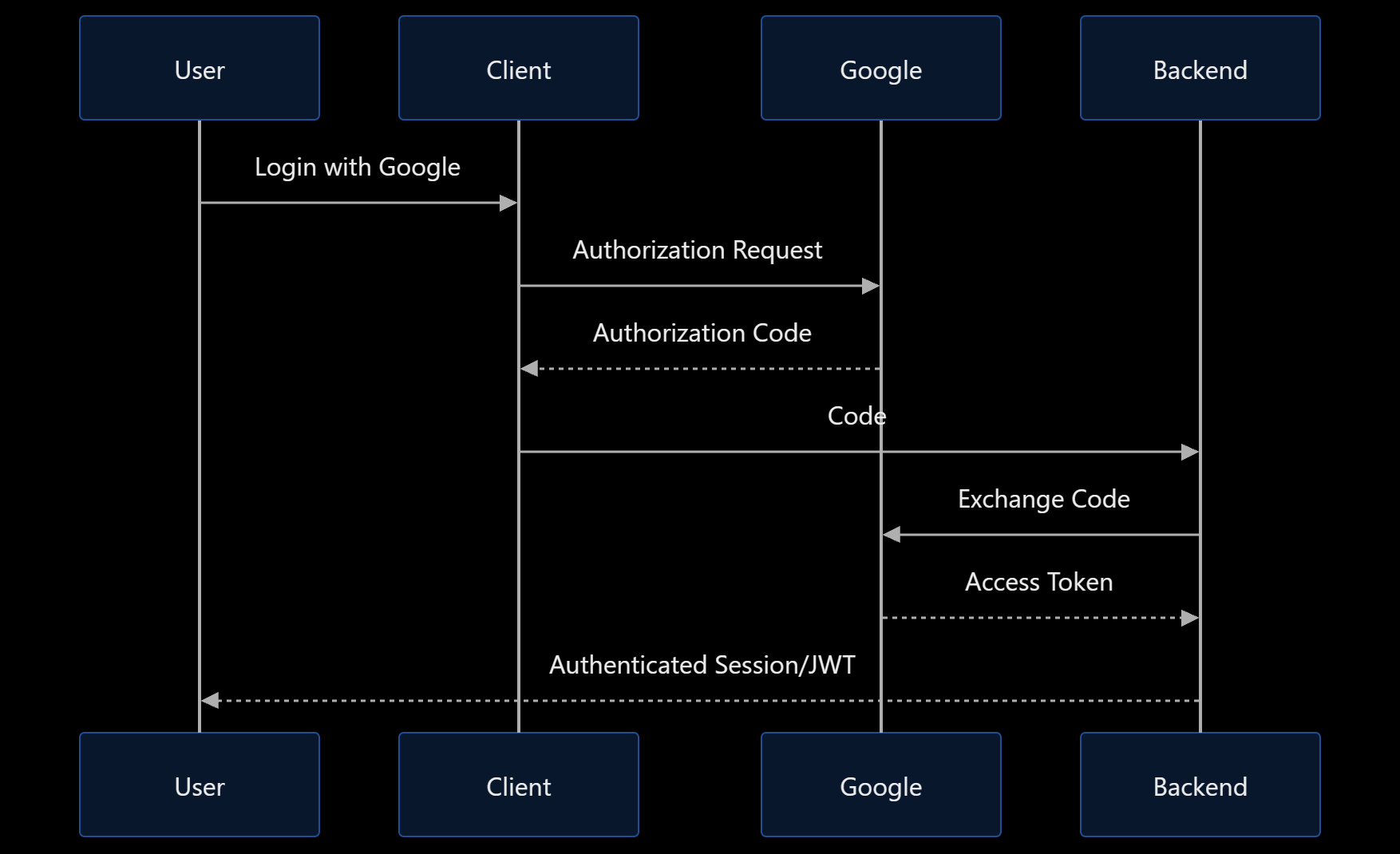
OAuth2 Flow
User
 ↓
Login with Google
 ↓
Google Authentication
 ↓
Authorization Code
 ↓
Backend
 ↓
Access Token
 ↓
Authenticated User
The application never sees the user's Google password.
Google handles authentication and sends trusted information back to the application.
Benefits:
Better user experience
Strong security
Faster onboarding
Reduced password management
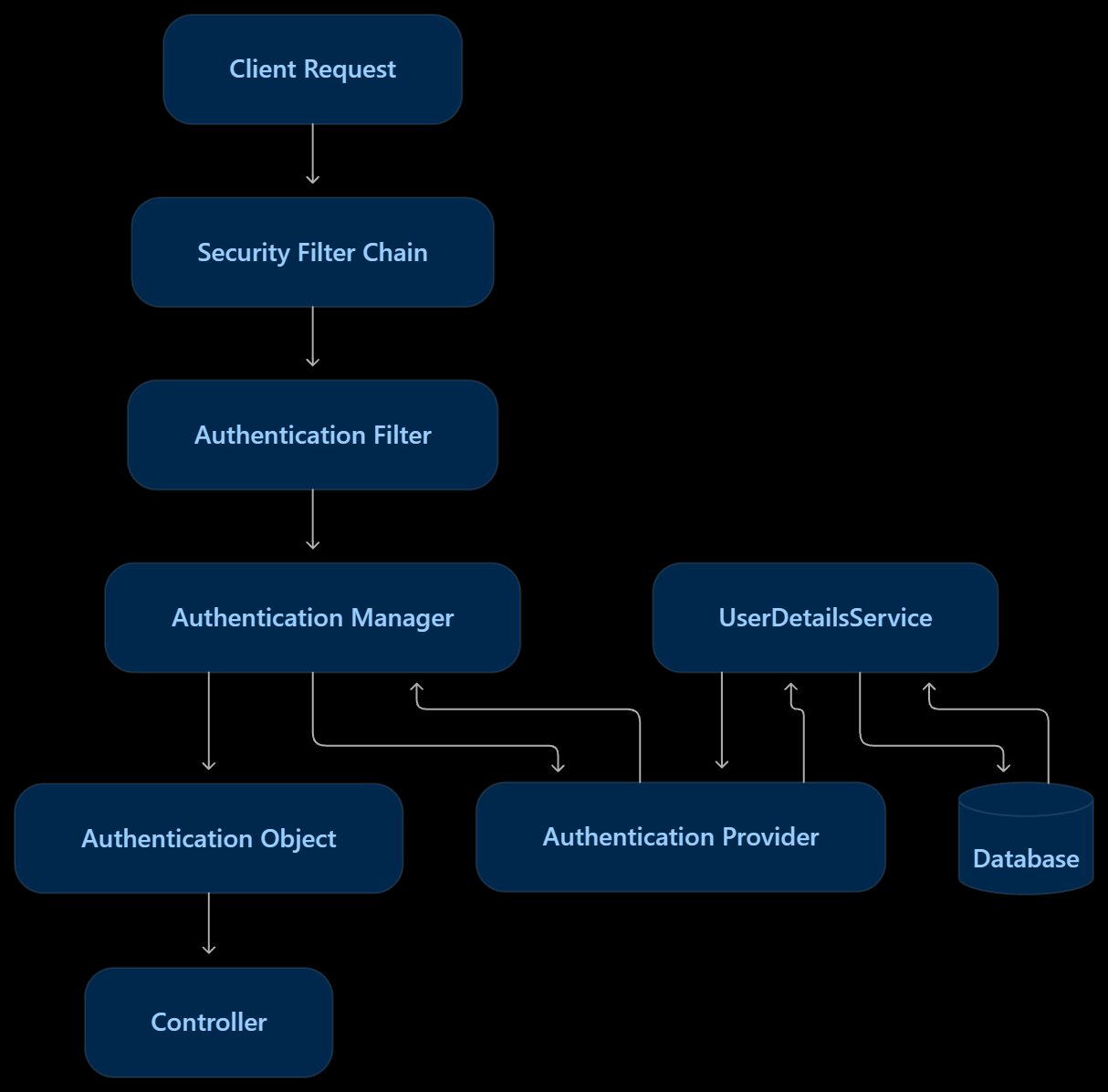
How Everything Connects Together
At first, Spring Security appears to contain many unrelated components.
But when viewed as a request journey, everything becomes much simpler.
Client Request
      ↓
Security Filter Chain
      ↓
Authentication Filter
      ↓
Authentication Manager
      ↓
Authentication Provider
      ↓
UserDetailsService
      ↓
Database
      ↓
Authentication Object
      ↓
Security Context
      ↓
Authorization Check
      ↓
Controller
Every component has one responsibility.
Together they create a powerful and secure authentication system.
📷 Add Image 7 Here (Most Important):
A complete end-to-end authentication architecture diagram combining all components.
Final Thoughts
Learning Spring Security can initially feel intimidating because of the number of components involved. However, once you understand the request flow, everything starts to make sense.
The Security Filter Chain acts as the gatekeeper. Authentication Manager coordinates authentication. Authentication Provider verifies credentials. UserDetailsService retrieves user information. JWT enables stateless authentication, while OAuth2 allows users to log in through trusted providers like Google.
Instead of memorizing classes and configurations, focus on understanding the journey of a request. Once you understand that journey, configuring Spring Security becomes significantly easier.
The next time you see terms like Authentication Manager, JWT Filter, UserDetailsService, or OAuth2 Login, you won't view them as isolated concepts. You'll understand exactly where they fit in the authentication process and why they exist.
Happy Learning and Happy Coding 🚀